
My summary of Gumloop before using it – A workflow automation tool similar to tools like UiPath, Cassidy AI, Zapier and n8n.
How does Gumloop work? I started with a simple workflow to understand Gumloop’s core building blocks:
- Core Nodes – Fundamental components like web scrapers, PDF extractors and data manipulators that form your workflow’s backbone.
- Using AI – Leveraging events for various tasks e.g. LLM prompting, data extraction or image generation.
- Triggers – Automating actions based on specific events e.g. time triggers or calendar event readers.
YouTube to blog post

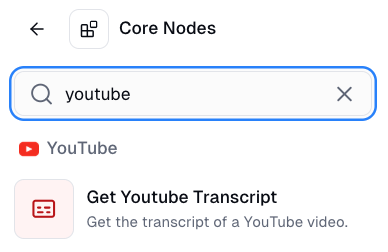
I chose the simplest task I could think of: converting a YouTube video into a blog post. Clicking the pink + button lets you search for the right node type.
I then used a transcript node to generate a transcript of using Andrej Karpathy’s Intro to Large Language Models talk. Next, I added an Ask AI node to transform that transcript using an LLM of my choice. For straightforward automations, choose smaller, cheaper AI models to keep costs down.
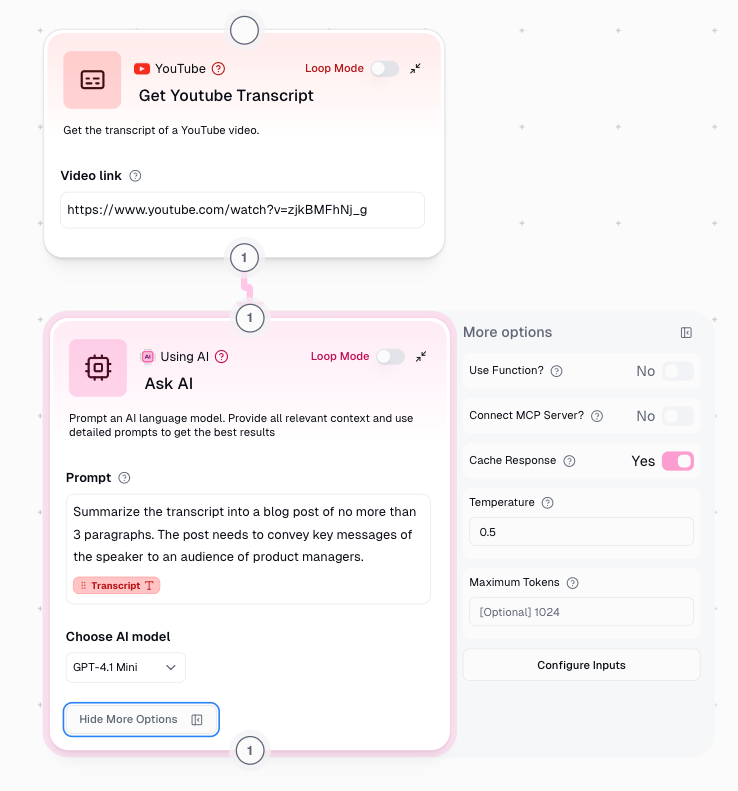
The temperature setting on this note is important. Like other AI tools, Gumloop’s temperature ranges from 0 to 1, controlling response creativity. Set it to 0 for precise, factual output or closer to 1 for more creative responses. My generic prompt worked well, though more context would have improved the result.

The concept of a flow, each with its own nodes (and sub flows), is the main thing that I’m learning about as I’m playing more with Gumloop. Like with all these tools, I need to make sure I set up the right credentials so that Gumloop can access tools like Gmail, Google Slides and LinkedIn.


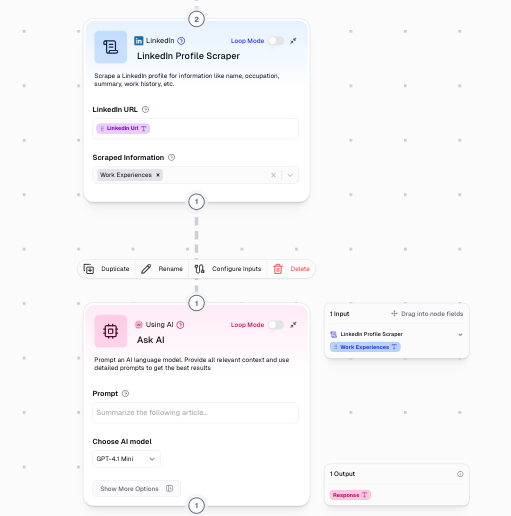
“Inputs” and “outputs” is another key concepts when using Gumloop, with the tool providing a fairly intuitive way to feed the output of the previous node into the next step.
Main learning point: I’m constantly searching for automation tools that are foolproof and intuitive, hoping to automate flows without much thought. Even with Gumloop’s user-friendly interface, I was reminded that successful automation still requires crystal-clear thinking about your desired workflow. Even with a tool that feels as intuitive as Gumloop, the onus is still on me to have clarity about the process I want to automate and the outputs I want it to generate.
 As I learn ...